
Helping Game Developers Move Faster by Reducing Workflow Complexity
Hub for Creator Tools | VA Toolshelf | PlayStation Visual Arts
VA Toolshelf is a centralized creator tools platform used by artists and game developers across PlayStation Visual Arts to access, manage, and update production software. As adoption declined, rigid workflows, accessibility barriers, and system-driven update patterns created friction and eroded trust.
As the sole Senior UX Designer, I led the product strategy and experience design in close partnership with the Lead Software Engineer, transforming the platform from a system of control into a system of support and increasing adoption from 60% to 90%.
Product Strategy
Experience Architecture
Interaction Design
Lead Software Engineer
PSVA Departments: Production, Mocap, Animation, Rigging, Sound, Art and Engineering
Native Desktop Tool / App for PC, MAC, and Linux
Stakeholders
5 Months
Challenge
Despite being a mission-critical studio platform, VA Toolshelf was difficult to navigate and inefficient for launching software, leading users to bypass the system entirely. Declining adoption created downstream pipeline fragmentation, licensing compliance risks, and gaps in studio-wide visibility, disrupting creative flow and operational integrity.
Business Goals
Increase adoption of VA Toolshelf as the studio's trusted entry point for creator software, reducing reliance on fragmented access methods.
Strengthen operational visibility and licensing compliance through centralized software access and consistent usage tracking.
Impact Metrics below:
Based on comparative usability testing, platform analytics, stakeholder interviews, tool usage reporting, and user satisfaction surveys.
100%
Ease of Use
90%
Intuitive - Finding & launching Tools
30%
Increase in Overall Adoption Rate


The Project
Discovery Insights:
The VA Toolshelf sat at the center of PlayStation Visual Arts' production pipeline, serving as the primary hub for launching software and managing studio tools. Despite its importance, adoption had fallen to 60% as creators bypassed the platform due to cluttered navigation, poor accessibility, and workflows that interrupted production.
Research revealed the core issue wasn't usability alone, it was trust. The platform prioritized system enforcement over creator workflows, turning routine updates into disruptive experiences that discouraged engagement.
Solution Strategy:
Rather than adding features, the redesign focused on supporting creative flow by simplifying discovery, improving accessibility, and giving users greater control over how they managed their tools.
The solution introduced:
Curated tool discovery through search, filters, and favorites.
Update scheduling that balanced user autonomy with production requirements.
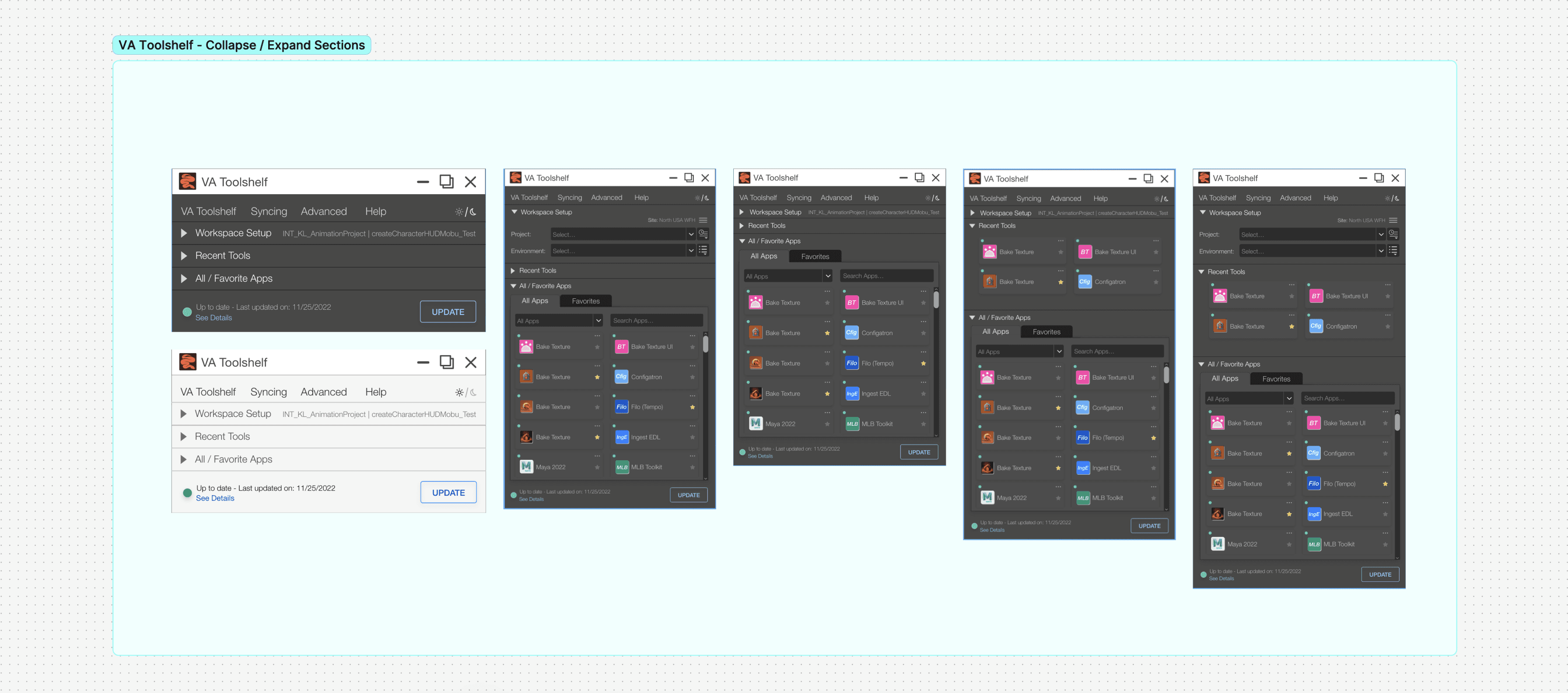
A collapsible interface designed around real multi-monitor production workflows.
Strategic Insight:
The adoption problem arose from the lack of trust. A platform designed to enforce compliance had to become one that supported creative work.




Lessons Learned
Rebecca Abel
Senior Software Engineer | PlayStation